
Play without limits
Your media.
Simply better.
A fast, focused desktop player for video and audio—with persistent libraries, synchronized lyrics, automatic subtitles, broad format recovery, and direct handoffs into the Legacy production ecosystem.
Release Candidate 1 evaluation build · Windows 10/11 · Mac release coming after signing and notarization
Open once. Pick up where you left off.
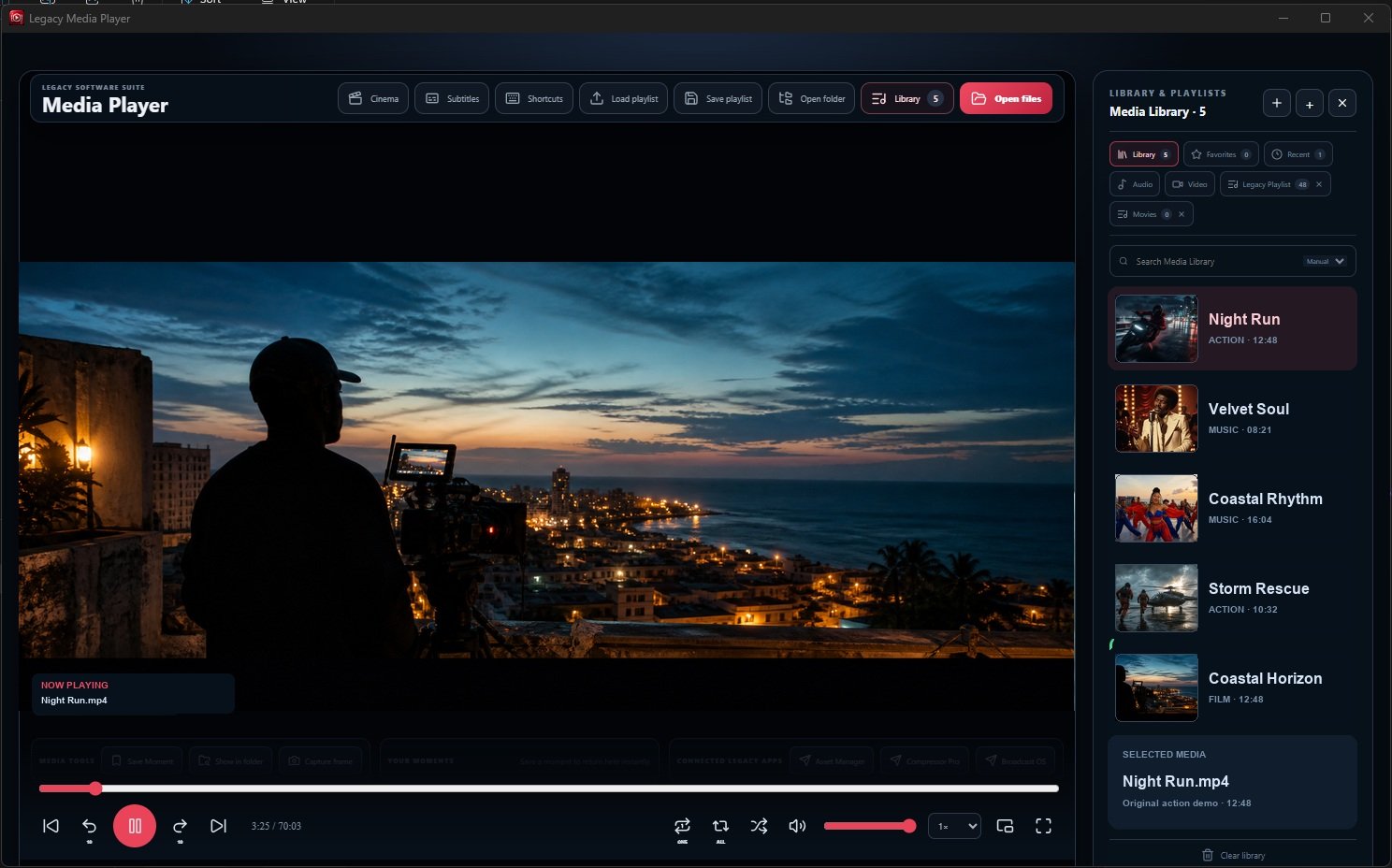
Legacy Media Player restores your library, active playlist, current title, playback position, favorites, recently played media, and saved moments. It is designed to get out of the way when you want to watch—and become a powerful workflow tool when you need more.
Persistent media library
Keep named audio and video playlists, favorites, recent items, manual ordering, and last-used folders between sessions.
Smart lyrics
Find synchronized lyrics, preserve provider timing, automatically compensate for music-video intros, and fine-tune timing manually.
Automatic subtitles
Matching SRT, VTT, ASS, and SSA sidecar subtitles are discovered and loaded automatically alongside your movie.
Format recovery
When the system player cannot decode a file, create a cached H.264/AAC compatible copy without changing the original.
Media tools
Save playback moments, capture full-resolution frames, reveal source files, repeat one or all, shuffle, and use picture-in-picture.
Legacy app handoffs
Prepare media for Asset Manager, Compressor Pro, and Broadcast OS through a shared integration queue.
Cinema-first design
Controls when you need them. Picture when you don’t.
The interface keeps playback central, with keyboard shortcuts, cinema view, fullscreen, picture-in-picture, adjustable speed, precise seeking, and a library that can be hidden in one click.
Broad compatibility
From everyday media to legacy archives.
MP4, MOV, MKV, M4V, WebM, MPEG, TS and MXF
AVI, WMV, ASF, FLV, VOB, DivX, RM and RMVB
3GP, 3G2, MTS, M2TS and M2V
MP3, WAV, FLAC, AAC, M4A, OGG, AIFF, Opus, WMA, AC3, APE and AMR
Trial download
Test Legacy Media Player RC1.
Use the release-candidate evaluation build with your own media for one week. Tell us what works, what needs refinement, and which formats matter most to your workflow.
Windows 10 / 11
64-bit installer with the native compatibility engine included.
Apple Silicon Mac
Mac version coming after Apple signing and notarization.
Before you download.
Is this the final public release?
This is Release Candidate 1, provided for evaluation before the final signed and notarized release. Features are substantially complete, but testing feedback may lead to refinements.
Does the player upload my media?
No. Playback, libraries, frame captures, compatibility copies, and saved moments remain local to your computer. Online access is used only when you choose smart lyric or artwork matching.
What happens when a codec is not supported?
The player can create a separate cached H.264/AAC compatible copy using its included media engine. Your original file remains unchanged.
When will the Mac build be available?
The Mac RC1 download is temporarily unavailable while we correct an opening issue and produce a signed and notarized DMG. Please do not use the previous Mac installer. We will restore the download only after the replacement has been verified.
Is an Intel Mac version available?
RC1 currently targets Apple Silicon. Intel Mac support is planned based on tester demand.
Part of the Legacy Software Suite
Play. Organize. Prepare. Broadcast.
Legacy Media Player is designed to stand alone—and to become even more useful alongside Asset Manager, Compressor Pro, Media Grabber, and Broadcast OS.