
Broadcast playout automation for global broadcasters
Global playout is a continuity challenge as much as a scheduling task. Broadcast playout automation software uses software and video servers to play scheduled channel programming to air, coordinating workflows across channels and operating locations. For broadcasters serving audiences worldwide, the system must account for more than what appears on the schedule.
Reliable scheduling matters, but so does maintaining visibility and control when teams work across locations, live sources enter the workflow, or a primary path is interrupted. These operational needs shape how playout is configured and monitored.
This article explains how cloud access, live input, multiviewing, redundancy, and media mirroring support automated playout for global broadcasters. It also covers how these functions work together, what to consider when choosing a system, and how software can support a controlled playout workflow.
Key Takeaways
- Plan cloud access around how distributed teams need to control schedules and coordinate playout.
- Assess how live inputs fit into channel workflows, and use multiviewing to monitor sources and outputs.
- Design redundancy and media mirroring to support continuity when a primary path or media copy is unavailable.
- Map scheduled programming and operational oversight across channels to identify where automated playout can simplify global delivery.
Cloud playout and multi-user access
Cloud playout runs television automation through remote computing resources rather than relying solely on equipment at a broadcast site. On-premises systems keep processing and control within the facility, while cloud-based television automation moves some or all of those functions to hosted infrastructure. A broadcaster can also combine both environments, retaining local components while connecting teams to shared schedules and workflows.
Multi-user access changes how operators coordinate daily work. A scheduler can prepare a channel rundown while another operator reviews upcoming events from a separate location. Set permissions by task, such as schedule editing, media preparation, or playout monitoring. Then assign clear ownership for changes so teams can see who updated an event and which version is ready to air.
How do broadcasters migrate to and configure a playout automation system? Start by mapping channels, schedules, media paths, live sources, and operator responsibilities. Configure the target environment, test representative playlists and outputs, then move channels in a controlled sequence while monitoring execution.
For a hybrid setup, decide which tasks stay on-premises and which move to the cloud. For example, a broadcaster might retain local signal handling while allowing remote staff to prepare schedules. The right division depends on workflow requirements, network connectivity, access controls, and how the team responds to interruptions. Document these boundaries before configuring users or channel outputs.
Interoperability matters when systems exchange media and control information. The EBU and AMWA are working on Dynamic Media Facilities and MXL to improve interoperability. For broadcasters, this work highlights the value of defining how schedules, media references, and operational data pass between tools. Before deployment, map those exchanges and test them with representative channel workflows. A broadcast playout automation software deployment should reflect actual access patterns, not simply reproduce a facility’s existing setup in the cloud.
Live input integration and multiviewing
Live input integration brings real-time sources into a scheduled channel workflow. A control room might switch from a prepared segment to a studio camera feed, then return to the playlist after the event. Define each source, its expected format, and the event that triggers its use. This prepares operators for the transition instead of treating live content as a separate task.
How do broadcast playout automation systems compare for TV, radio, and streaming? Television workflows coordinate video, audio, graphics, and channel output; radio centers on audio sources and scheduled segments. Streaming adds delivery endpoints and stream monitoring, so the system should match the channel’s media and output requirements.
What hardware and integrations are required for broadcast playout automation? Requirements depend on the source and destination, but can include input and output interfaces, video servers, monitoring displays, and network connections. Map each live source to its ingest path and each channel to its output before configuring integrations.
Multiviewing gives operators a combined view of relevant sources and outputs. For example, a layout can help an operator compare an incoming studio feed with the channel output during a live transition. Assign screen space according to operational priority, then check that labels clearly distinguish sources. This makes it easier to spot a missing feed or incorrect output before it affects the scheduled sequence.
API integrations connect playout with other systems, such as scheduling, media asset management, or graphics tools. Define what information each system exchanges, such as an event trigger or media reference, and test the handoff with a representative playlist. Integrated channel solutions can coordinate these functions within one operational workflow, reducing separate control steps when the systems support that connection.
To assess fit, trace one real event from source intake through monitoring to channel output. Explore integrated playout workflows as you map how these handoffs should work for your operation.
Redundancy and automatic media mirroring
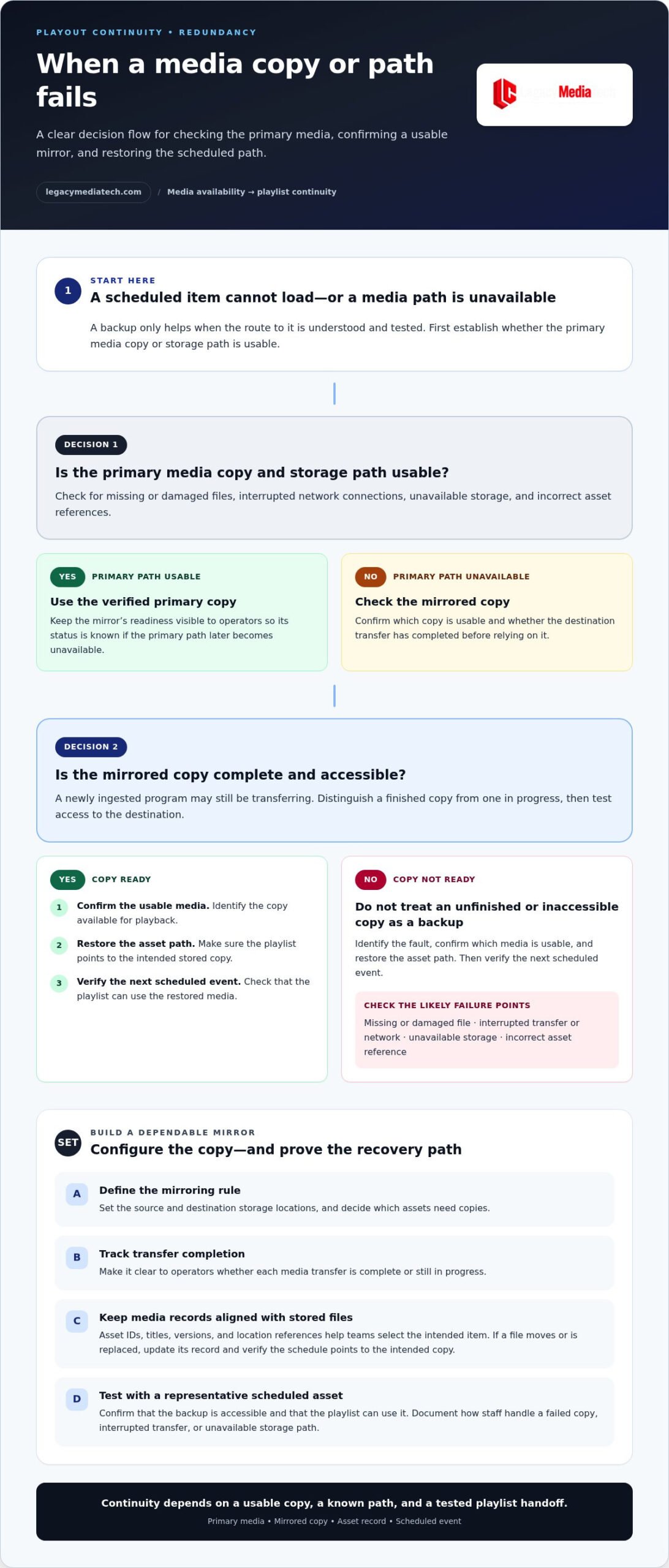
Redundancy protects playout when a media copy, storage path, or playback component becomes unavailable. For example, a channel can use a primary media location and a separate mirrored copy. Configure the system to identify which copy is ready, show operators when a fault occurs, and specify how playback should respond. A backup only helps when the operational path to it is understood and tested.
Common risks include missing or damaged files, interrupted network connections, unavailable storage, and incorrect asset references. These problems can prevent a scheduled item from loading or leave operators unsure which copy is current. Use a defined recovery process: identify the fault, confirm the usable media, restore the asset path, and verify the next scheduled event.
Automatic media mirroring copies media between designated storage locations according to configured rules. Set the source and destination, decide which assets need copies, and track whether each transfer is complete. For a newly ingested program, operators need to distinguish a finished copy from one still transferring. Test access to the destination copy before relying on it during playout.
Media asset management connects files with the information teams need to use them. Asset IDs, titles, versions, and location references help teams select the right item for a playlist. If a file moves or gets a replacement version, update its media record and verify that the schedule points to the intended copy. A mismatch between a record and its stored file can interrupt an otherwise valid rundown.
For media and broadcast operations, document how staff handle a failed copy, interrupted transfer, or unavailable storage path. Run a practical test with a representative scheduled asset, then confirm that the backup is accessible and the playlist can use it. Record the result and recovery steps. Repeating this process after workflow changes helps keep media records, mirrored files, and playout decisions aligned.
Automated playout for global broadcasters
Global playout must coordinate scheduled programming, channel outputs, and operational records across markets. Compare platforms by how well they fit your workflows, support compliance controls, and help teams manage handoffs.
Software Platform Selection
There is no single best platform for every broadcaster in 2026. Select by channel format, live and scheduled content, output destinations, access needs, and the records operators require. Then test a representative playlist, including a live event and a scheduled transition. For international operations, assess how teams manage regional schedules and localized versions without losing control of the channel rundown.
In the United States, FCC compliance needs depend on the broadcaster’s service and content. Configure the playout workflow to support required scheduling, monitoring, and recordkeeping, and assign responsibility for reviewing those records. Treat compliance as an operational requirement when comparing systems, not merely as a feature label.
For global operations, map each channel’s schedule, local content, and output destination. A program prepared for one market may need a different version or timing elsewhere. Keep channel-specific rundowns clear, assign review responsibility, and test a regional handoff before relying on it. This helps teams distinguish a global master schedule from local changes.
Software Cost Considerations
In the United States, pricing depends on the project and is provided after a quote request. Cost factors include the number of channels, deployment model, required integrations, workflow complexity, and redundancy needs. Compare proposals against the same scope, including configuration and recurring software costs. This gives decision-makers a practical basis for assessing total project requirements without relying on a headline figure.
Scheduling can be built days or weeks in advance, and as-run logs can be reconciled automatically. Use these functions to define the workflow a platform must support, then compare how each candidate handles schedule changes, regional outputs, and records. For global broadcasters, the key is to evaluate complete channel operations, not isolated playout features.
Legacy MediaTech: Broadcast OS
Legacy MediaTech offers Broadcast OS for broadcasters assessing software for playout automation and channel workflows. It is a relevant next step when your operational requirements are defined and you’re evaluating how software can fit your scheduling, media, and output processes.
Use your workflow map to guide the discussion. Identify the channels and content types involved, the steps operators perform, and where coordination or automation matters most. This gives you a practical basis for evaluating Broadcast OS against your playout needs. Legacy MediaTech also offers Legacy vFlow, Instant Replay, and Legacy StoryFlow for related production and newsroom workflows.
To discuss how Broadcast OS fits your requirements, contact Legacy MediaTech or visit legacymediatech.com.
Set the Next Playout Milestone
Turn operational priorities into measurable acceptance criteria before changing a live workflow. Define what operators must be able to schedule, monitor, recover, and report. Then test those tasks against representative channel scenarios, including routine programming and live transitions. This gives your team a practical basis for deciding whether a broadcast playout automation software setup fits its day-to-day requirements.
Use the results to identify the next improvement, such as clarifying schedule ownership, refining media-handling steps, or aligning regional workflows. Assign responsibility for each change and record how the team will validate it. A controlled sequence makes future adjustments easier to assess and keeps operational decisions grounded in actual channel needs.
When you’re ready to discuss how your playout requirements align with available software, contact Legacy MediaTech about playout. A clear workflow map gives the conversation a useful starting point and helps you move forward with purpose.
Frequently Asked Questions
What is broadcast playout automation software and how does it work?
Broadcast playout automation software manages the execution of a channel’s programmed content, reducing the need for operators to trigger every item manually. It uses scheduling information and media references to play content in sequence. For example, a station can prepare a rundown of programs and interstitials, then monitor each item’s progress while retaining operator control over changes.
What features should broadcasters look for in playout automation software?
Look for clear schedule editing, practical operator permissions, and a reliable way to review what aired. Test how the system handles a late schedule change, a missing media reference, and a handoff between shifts. Check whether operators can see the current playlist state and quickly identify pending actions. These practical checks reveal workflow friction that a feature list alone may miss.
How does playout automation support redundancy, failover, and disaster recovery?
Automation supports continuity by making recovery actions part of a documented operating process. Define who can authorize a switch, where operators can find the current schedule, and how they resume service after an outage. For disaster recovery, rehearse restoring essential media records and playlists in a separate environment. Record gaps from each exercise, then update the runbook so staff can follow the same recovery sequence.
What are the best broadcast playout automation software platforms in 2026?
There is no single best platform for every broadcaster in 2026. Choose based on channel format, live and scheduled content, output destinations, access needs, and operational records, then test a representative playlist and regional handoff.
What FCC rules and compliance features affect broadcast playout automation in the United States?
FCC compliance needs depend on the broadcaster’s service and content. Configure playout to support required scheduling, monitoring, and recordkeeping, and assign responsibility for reviewing those records.
How much does broadcast playout automation software cost in the United States?
Pricing is provided after a quote request. Costs depend on channel count, deployment model, integrations, workflow complexity, and redundancy needs.