
Legacy vFlow
30-day trial of television playout automation for vMix, including scheduling, commercials, filler and continuous channel operation.
Explore the interactive showcase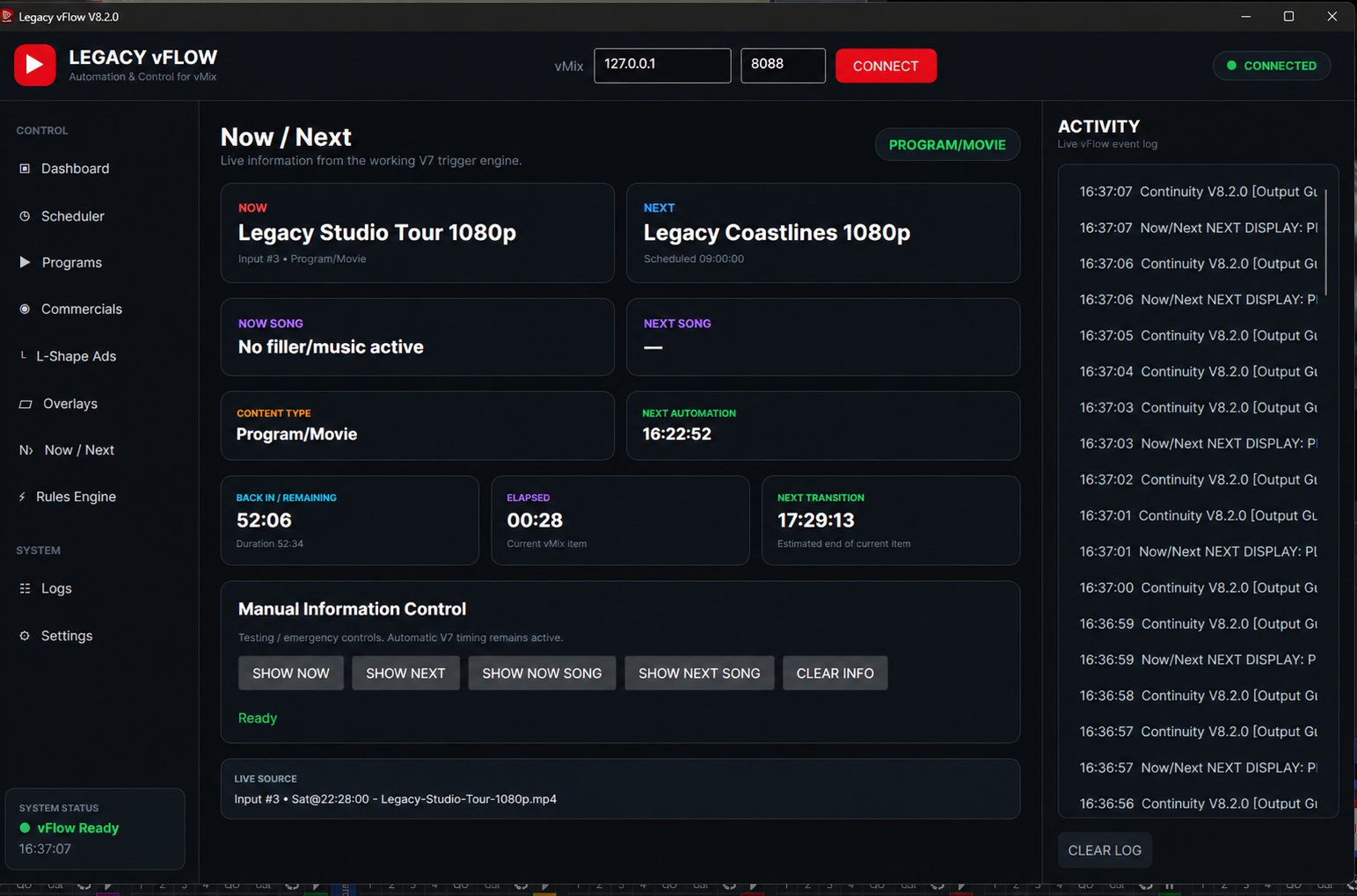
Automation and control built around the live schedule.
Explore the interface. Select a numbered detail for a closer look.
Automate your television channel without replacing vMix.
Legacy vFlow is professional television playout automation built for broadcasters already using vMix. Schedule programs, movies, recorded content, commercials, events and filler while keeping your broadcast day visible and under control.
See Legacy vFlow in action
Automation built around your live schedule
Keep scheduled programming and channel continuity moving throughout the broadcast day.
Automate your existing vMix workflow without replacing the production system your team already knows.
Coordinate recorded programs, movies, commercial breaks, events, overlays and timed control actions.
See the active program, upcoming item, content type, elapsed time, remaining time and next transition.
Use automatic filler and playlist continuation to help protect the station when scheduled content ends early or a gap appears.
Monitor connection state, active sources, automation activity and system readiness while retaining fast manual intervention.
Start your 30-day free trial
Test Legacy vFlow with your existing vMix setup. Legacy MediaTech can help your technical team get the trial installed and ready for evaluation.
Start Your 30-Day Free Trial Download User Manual Request a Demo Chat on WhatsApp
Version 8.3.2 · Windows · 145.9 MiB
Verify SHA-256 checksum
System requirements
- 64-bit Windows 10 or Windows 11
- A working vMix installation and production preset
- vMix Web Controller/API enabled on a reachable host and port
- No separate .NET runtime required
- Space for the 145.9 MiB installer, application files, configuration and exported logs
Recommended: A stable broadcast PC, SSD storage, reliable local network and UPS protection.
Email: vflow@legacymediatech.com
WhatsApp / Telephone: +231 887 200 050
Keep automation understandable to the operator.
vFlow brings the schedule, current state, upcoming content, and live control together without hiding the real operation.
Schedule
Build programs, commercial blocks, overlays, songs, and automation rules around the broadcast day.
Connect
Link vFlow directly to the active vMix system and confirm connection readiness.
Operate
Follow Now, Next, elapsed time, remaining time, content type, and the next transition.
Intervene
Use manual information controls and the live event log when direct control is required.
Everything the operator needs, without losing the live context.
This presentation uses the genuine Legacy vFlow interface, preserving its actual navigation, status panels, Now/Next cards, timing information, manual controls, and activity log.
- Dashboard, scheduler, programs, and commercials
- L-shape ads, overlays, and Now / Next control
- Rules engine, logs, and system settings
- Live source, connection, and activity visibility
Let’s design the right deployment.
Tell us about your operation and the outcome you need.
Book a Product Demo